SOEN 357 - Mini Project
Presented to: Dr. Hakim Mellah. Concordia University.
Project Overview
For this case study I designed a plan to help a startup create a mobile app for people with chronic health conditions. The goal of this application is to help users with chronic health conditions manage their medications and doctor appointments. The app allows users to set reminders, track their medication usage, and communicate with healthcare professionals.
1. User Research
Methodology
The nature of the project emphasizes the importance of conducting UX research in order to really understand the needs of the individuals. To deeply understand the needs, behaviors and pain points of the users, I decided to proceed with a mixed-methods approach. The goal of the research was to identify the friction points in their current daily routines and explore their comfort levels with automated data syncing and conversational interfaces.
Here are the three main phases of the approach:
1-on-1 User Interviews (Qualitative)
-
Objective
- To uncover the emotional and practical challenges of daily health management.
-
Focus Area
- I would conduct interviews with patients managing conditions like Diabetes and Hypertension to discuss their daily routines. The advantage of using this subset of users is their need to track their multiple medications on a daily basis. We will focus on the question of “app fatigue” in order to understand in a deeper level how they feel about navigating complex menus just to log a single medication dose or check an appointment.
Digital Surveys (Quantitative)
-
Objective
- To gather broad data on tech habits and validate the desire for an active, chat-based solution.
-
Focus Area
-
I would distribute structured surveys through online chronic illness support groups. To ensure comprehensive data collection, the survey would be broken down into four distinct question categories:
-
Demographics & Context: Multiple-choice questions to establish user age ranges, primary chronic conditions, and general comfort levels with mobile technology.
-
Current Habits & Frustrations: Likert scale questions (1-10) asking users to rate their frustration with manual data entry in current health apps, and how frequently they miss logging a dose due to “click fatigue.”
-
Feature Validation (Conversational UI): Scenario-based questions measuring their willingness to interact with a conversational bot (e.g., “Would you prefer texting ‘took my meds’ over opening an app and navigating a menu?”).
-
Data Privacy & Automation: Questions designed to gauge user trust and comfort levels with secure background conduits automatically pulling in their clinic’s scheduling data, balancing the desire for convenience against potential privacy concerns.
-
Competitive Analysis
-
Objective
- To identify gaps in the current market of health companion applications.
-
Focus Area
- I would analyze the top three health-tracking apps currently on the market. By mapping their user flows, I aim to highlight a common flaw: a heavy reliance on passive, static, website-style navigation that forces the user to do all the work, presenting a clear opportunity for a proactive, bot-driven alternative.
Persona
About
Tyler was diagnosed with Type 1 Diabetes in his early twenties. He leads a busy, high-stress corporate life. He knows he needs to track his blood sugar and insulin doses correctly for his doctor, but he gets incredibly frustrated with traditional health apps. He feels that having to navigate through four different screens just to enter a single number makes managing his condition feel like an unpaid part-time job.
Habits
- Checks his phone constantly for work emails and messages.
- Uses voice-to-text features frequently to answer quickly.
- Relies heavily on his calendar every day.
Pain Points
- "Click fatigue" from navigating complex, multi-layered app menus.
- Interrupting his workflow just to log simple health data.
- Forgetting to log doses because the current process takes too long.
Goals
- Log daily health metrics in under 5 seconds.
- Maintain accurate data records for his doctor.
- Integrate his health management seamlessly into his busy life.
About
Emma manages Hypertension. She highly values her independence but often struggles to keep track of her multiple daily medications and frequent specialist appointments. She finds manual data entry on modern smartphones confusing. Currently, she relies on physical pillboxes and paper calendars, but she sometimes forgets to update them or worries she has double-booked a doctor's visit.
Habits
- Keeps a very routine, structured daily schedule.
- Prefers reading simple text messages over navigating full applications.
- Values clear, straightforward communication without technical jargon.
Pain Points
- Manually entering complex medical appointments into physical calendars.
- Forgetting if she recorded the medication taken on standard pill reminder apps.
- Feeling overwhelmed by notification overload from complex apps.
Goals
- Never miss a medication dose.
- Have an automatic schedule of all her doctor appointments.
- Feel supported, independent, and in control of her health routines.
2. User Journey Mapping
To visualize how the conversational interface solves the “click fatigue” problem, I mapped out a daily interaction scenario for Emma.
Instead of opening an app and navigating through a calendar and a medication checklist, Emma’s journey is proactive. The HealthBot initiates the interaction, and secure data conduits handle the heavy lifting in the background. The map below outlines her touchpoints, emotional state, and potential pain points during a standard morning routine.
Proactive Trigger
Conversational Logging
Conduit Automation & Confirmation
3. Wireframing and Prototype Design
To translate the research and journey map into an actual product, I developed a high-fidelity, clickable prototype in Figma. But before making the high-fidelity prototype, I had to make sure that my layout made sense and first started with a low-fidelity prototype under the format of a wireframe.
Wireframing
Because the core UX strategy revolves around eliminating “click fatigue,” I intentionally discarded the traditional bottom-navigation bar and complex, multi-page dashboards. Instead, the wireframes are built entirely around a central Conversational Hub to keep the cognitive load as low as possible for users like Tyler and Emma.
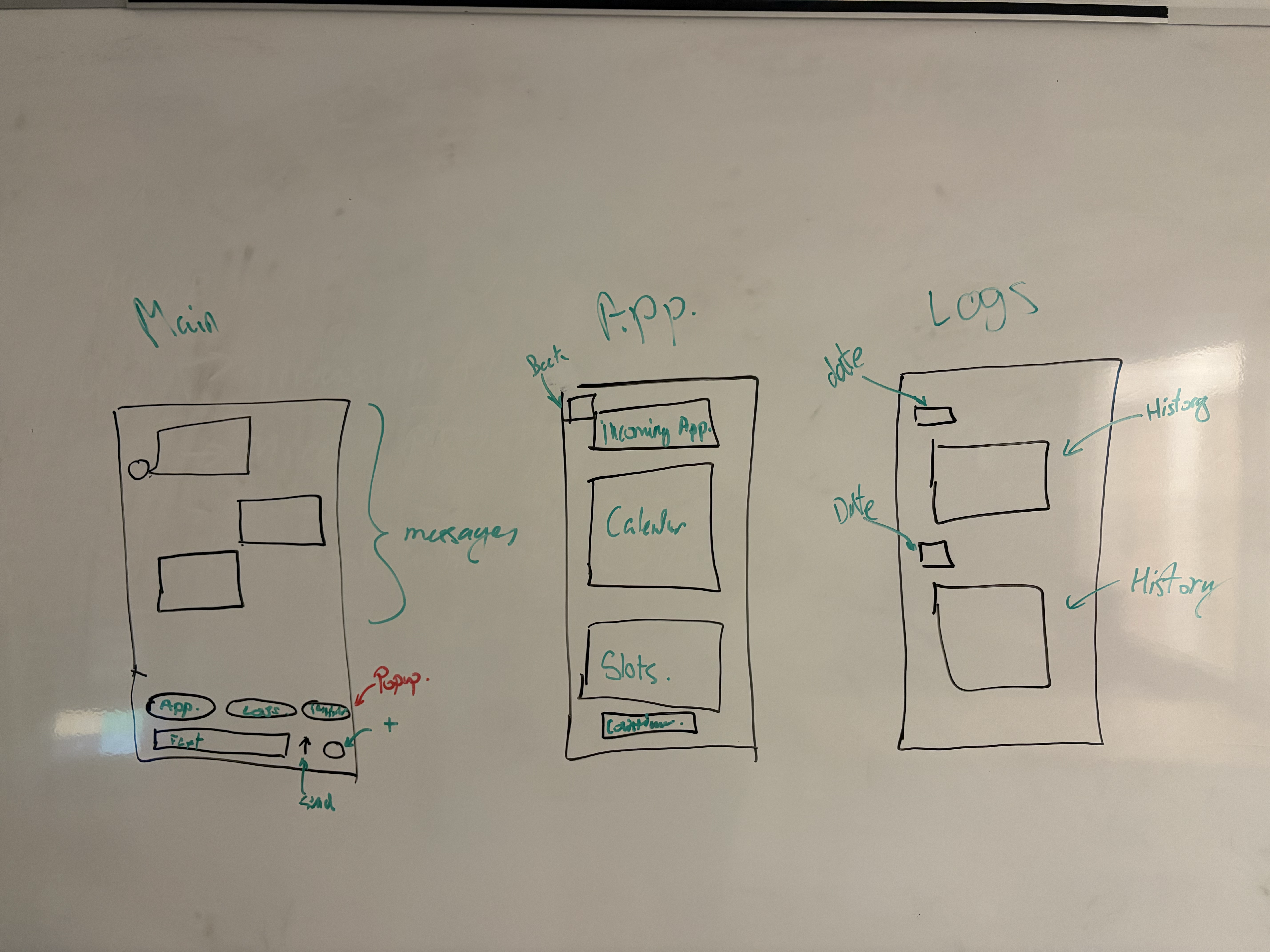
The wireframes map out three primary views:
-
The Main Conversational Hub: The default chat interface where all primary interaction happens. It features standard message bubbles, a text input field, and Quick Action menu (“Appointment”, “Logs”, “Reminders”) for frictionless navigation.
-
The Appointment Scheduler (“App.”): A focused scheduling view triggered from the main chat. It clearly displays a calendar, available time slots, and a single “Confirm” button to streamline the booking process.
-
The Health Logs History: A dedicated tracking screen that cleanly organizes past bot interactions and logged health data chronologically by date.
Prototype
Core Color Palette
To avoid the harsh, clinical feel of pure black and white, this app utilizes a high-contrast palette of rich, layered colors. The choice of rich black and white also allows to reduce eye strain for applications use through out the day. These colors also provide high-contrast allowing ease to distinct different elements and texts.
Typography
Inter
Primary Typeface0123456789 !@#$%&*
Inter was selected to maximize legibility within the conversational UI. It has been developed specifically for screens and provides distinct letters and numbers that allows the users to read fast and reduces errors. This font fulfills are goal to reduce user friction.
Showcase
The design for the Mid-fidelity prototype emphasizes the simplified and high-contrast UI with clear actions and basic animation. The basic animation allows the application to feel alive and responsive while not being overwhelming. The prototype itself is really simple and shows the general idea of it while still having development to be done. At least it allows to see the general idea and validates the core user flow before committing time to a final, high-fidelity visual design.
4. Usability Testing
To validate the effectiveness of the conversational bot interface and the background data conduits, I have outlined a usability testing strategy. The primary objective is to ensure that the chat-based logging is significantly faster and more intuitive than traditional menu-driven health apps.
Testing Goals
-
Evaluate Efficiency: Measure the time it takes for a user to log a medication dose via the chat interface compared to their current methods.
-
Assess Comprehension: Determine if users understand how the background conduits automatically pull their clinic scheduling data without manual entry.
-
Identify Friction: Determine the moments where the bot’s prompts feel unnatural, confusing, or restrictive.
Key User Tasks
Participants will be given the interactive prototype and asked to complete the following three core scenarios:
-
Task 1 (The Quick Log): “You just took your morning insulin. Use the chat interface to log 15 units.” (Testing the primary text/voice input flow).
-
Task 2 (The Proactive Reminder): “The app just notified you about a medication. Interact with the modal to mark it as taken.” (Testing the integration).
-
Task 3 (The Conduit Schedule): “The bot just informed you of an upcoming Cardiology appointment. Confirm the appointment slot provided.” (Testing trust and clarity of the automated scheduling).
Feedback Collection Methods
-
Moderated Remote Testing: Sessions will be conducted via Zoom, allowing the moderator to observe the participant and their screen interactions in real-time.
-
Post-Test Questionnaire: A short survey utilizing a Likert scale (1-5) to measure perceived ease of use, specifically asking if they preferred this chat format over standard medical app menus.
Analysis & Iteration Strategy
Following the testing sessions, the feedback will be synthesized to identify recurring patterns.
-
Metrics: If the completion time for Task 1 exceeds 10 seconds, the chat input UI needs to be simplified.
-
Iteration: Qualitative feedback regarding the bot’s prompts will be analyzed. If the users find the bot too robotic or confusing, I will iterate on the conversational design to make the prompts clearer and more human. Any visual friction, such as users missing the “Quick Reply” chips, will result in high-contrast UI adjustments in the next design iteration.
5. Reflection
Completing this UX case study reinforced the importance of challenging standard design conventions to truly solve user problems. Initially, it is easy to assume that a health management app requires complex dashboards and manual data entry forms. However, developing personas like Tyler and Emma revealed a critical, overlapping pain point: “click fatigue.”
The most significant learning outcome from this project was realizing that the best interface is sometimes barely a traditional interface at all. By shifting the focus away from a website-style layout and prioritizing an active, conversational bot, the design drastically reduces the cognitive load on the user.
Some key takeaways from this process:
-
Designing for Conversation: Creating an intuitive chat UI requires just as much structural planning as a traditional app. The challenge lies in making concise, natural, accurate and human prompts.
-
The Value of Journey Mapping: Mapping out a daily routine highlighted that users aren’t just looking for a functional tool, but they are looking for peace of mind. The proactive nature of the bot changes the emotional touchpoint from a frustrating chore to a helpful companion.
-
Automation as a UX Feature: Relying on secure background conduits to sync clinic data taught me that good UX isn’t just about what the user clicks, but what the user doesn’t have to do.
Ultimately, this project demonstrated that empathizing with the user’s daily struggles is the best way to build a product that actually improves their quality of life. Moving forward, I plan to use the usability testing feedback to continue refining the conversational flows, ensuring the app remains a stress-free part of their daily routine.